
Video to Script
Video-to-script mode uploads an existing short-drama video. AI parses picture, subtitles, and speech, then reconstructs a standard short-drama script. You can download the extracted script and import it into Script Creation, Adapt, Continue, Storyboard, or Agent—for ripping scripts from video, remake adaptations, and turning existing video assets into scripts.
1. Create a Video-to-Script Job

Open Video to Script; the Works list tab is shown by default.
Click the Upload video to generate script card to open the upload dialog.
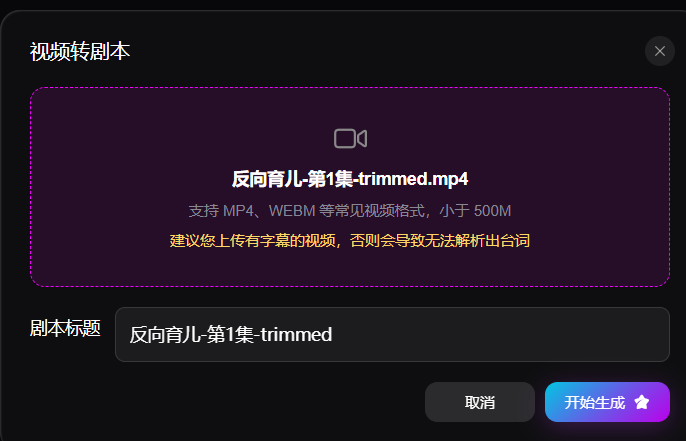
- Upload video: Drag and drop or click to choose a file. Mainstream formats such as MP4 and WEBM are supported, up to 500 MB
- Tip: Prefer videos with embedded subtitles. Videos without subtitles may miss dialogue recognition and lower script quality
- Script title (optional): If left empty, the video filename is used. You can rename the script project
After the file uploads, click Start generation. The system runs AI parsing and outputs a standard short-drama script.
2. Preview and Download
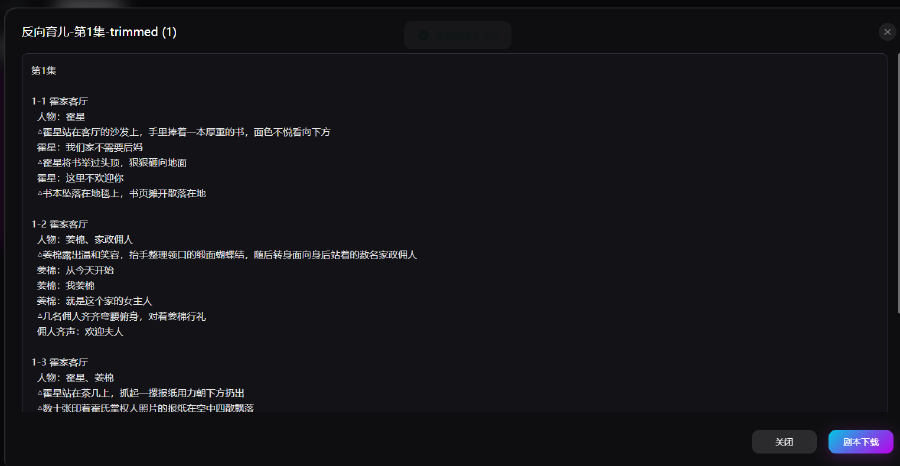
When generation finishes, you return to the works list with a project card and shortcut actions:
- Video preview: Play the original uploaded source to check the script against the video
- Script preview: Open a dialog with the full AI-parsed script in standard format—scenes, characters, action descriptions, and dialogue
- Click Download script at the bottom of the dialog to export the file
- Click Close to dismiss the dialog
- Download script: Export the script file without opening the preview dialog