
Member Management
1. Purpose
This page is the project member permissions and credit-usage control center. It is available in all three creation modes (Agent, Storyboard, and Overseas) to support team collaboration and daily credit limits per member.
2. Role Rules
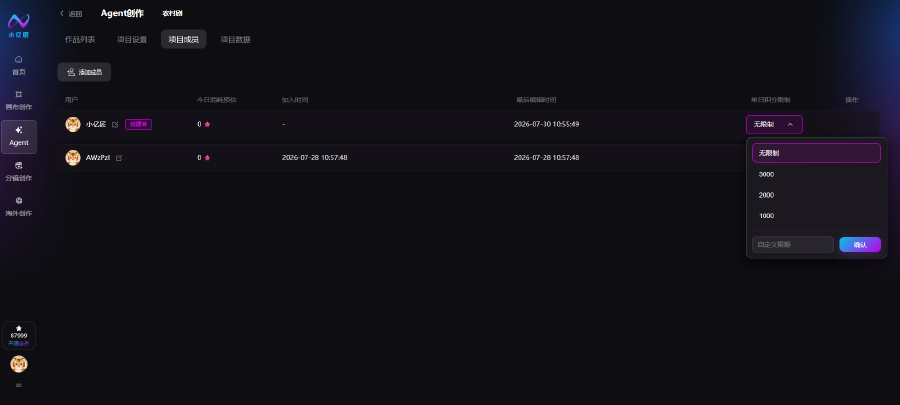
The project creator is automatically assigned the Manager role when creating the project and has full permissions. Managers have no default daily credit cap. All AI generation costs (text, image, video) from collaborators are deducted from the creator's account.
Invited collaborators join as Collaborators. They can perform in-project creation work only—no member management or quota changes. Their AI usage is also charged to the project creator.
3. List Columns
- User: Member display name; Creator badge marks the project owner
- Today's estimated usage: Credits consumed by the member today
- Joined: When the member was invited to the project
- Last edited: Last time the member performed creation work in the project
- Daily credit limit: Core control for maximum credits per member per day
- Actions: Quota adjustment dropdown (managers only)
4. Credit Quota Configuration
- Click the Daily credit limit dropdown on the right of a member to open the panel
- Choose a preset: Unlimited, 1000, 2000, or 3000 credits/day; or enter a custom amount
- Click Confirm to apply. After the daily limit is exceeded, the member cannot start new AI generation tasks in this project
- The project creator always defaults to Unlimited so project progress is not blocked by quotas
5. Add Members
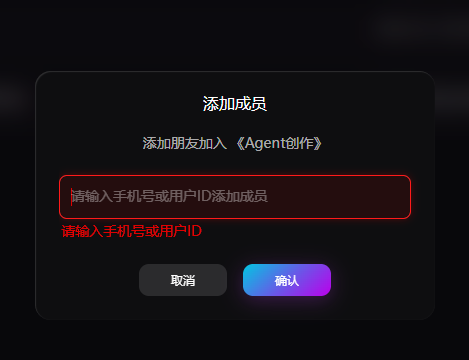
- Click Add member in the top-left to open the dialog. Search by phone number or platform user ID
- Enter the target account accurately and click Confirm to send the invitation
- Click Cancel to close without adding
- After a collaborator joins, the manager can set their daily credit limit immediately. All AI usage still deducts from the project creator's account